
Locked Shipment Status
Locking is available on outbound shipments. When a shipment is Locked, it cannot be edited by anyone, including staff. No quantities or services can be modified until the shipment is unlocked.
How to Lock a Shipment
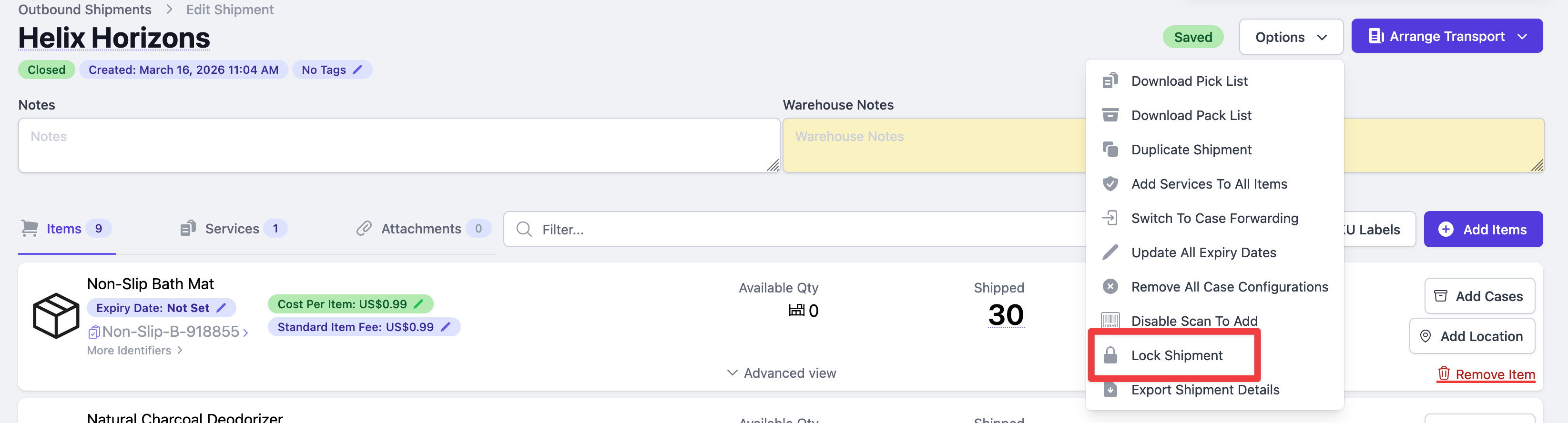
- Open the shipment you would like to lock.
- Select "Lock Shipment" from the Options dropdown.
Who Can Unlock a Shipment
Any staff user on your account can lock and unlock a shipment, whether their role is Owner, Office or Warehouse. Your clients cannot, so a locked shipment stays locked as far as the merchant is concerned.
How to Unlock a Shipment

- Open the locked shipment.
- Select "Unlock Shipment" from the Options dropdown. You can also click the x on the yellow "Locked" badge next to the shipment status.
- The lock will be removed and editing will be re-enabled.