
Per Item Adjustment for Client-Specific Pricing
The Per Item Adjustment feature allows you to add a fee or discount to every item processed for a specific client. This is useful when you want to offer different pricing to certain clients without changing your default service prices.
Common Use Case: Grandfathered or VIP Pricing
If you want to increase prices for new clients while keeping existing clients at their current rate:
- Update your default service price to the new rate (for example $0.50 per unit)
- For each existing client you want to keep at the old rate, set a negative Per Item Adjustment (for example -$0.15)
This applies a discount to every unit those clients ship, keeping them at the effective lower rate while new clients get the full default price.
How to Set Per Item Adjustment
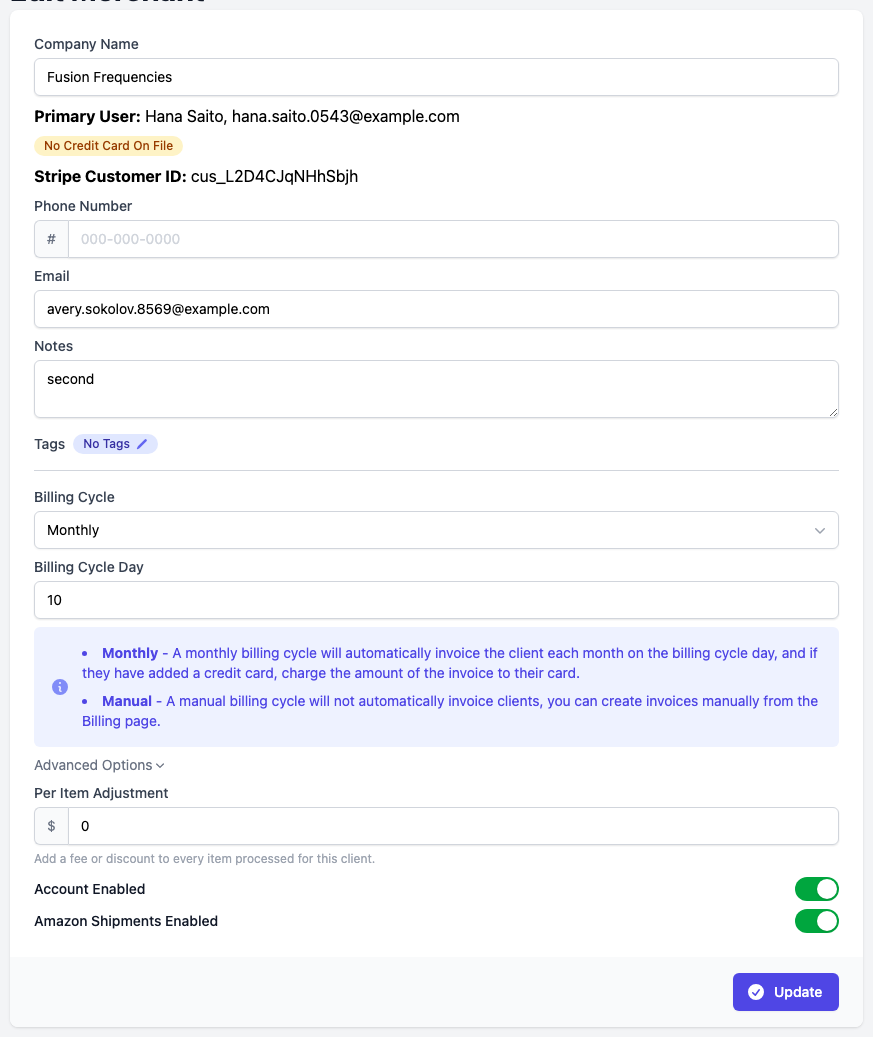
- Go to Merchants and select the client you want to adjust, or open Merchant Details from the sidebar with that client selected
- You are now on the Edit Merchant page
- Expand Advanced Options
- Enter the adjustment amount in the Per Item Adjustment field. Use a negative value for a discount. The value has to be between -9.99 and 9.99
- Click Update to save
How It Works
The Per Item Adjustment is added to the cost per unit of every item processed for that client. It is folded into the item line on the charge rather than shown as its own line, so an item with a $0.99 service and a $0.10 adjustment shows a cost per item of $1.09.
- Positive values add a fee per unit
- Negative values apply a discount per unit
- The adjustment is charged on every unit shipped, not once per item line